
Choosing the right fiber distribution box comes down to three decisions: where the box sits on the route, how many drop cables it must terminate, and what weather it has to survive. A wall-mount box with IP65 protection and 8–16 SC ports covers most building entries; pole-mount enclosures suit overhead routes with no usable wall; dome and inline styles carry higher fiber counts on buried or aerial trunk segments. This guide walks procurement teams and field engineers through each option, the ingress-protection ratings that matter, and the specs to confirm before ordering.
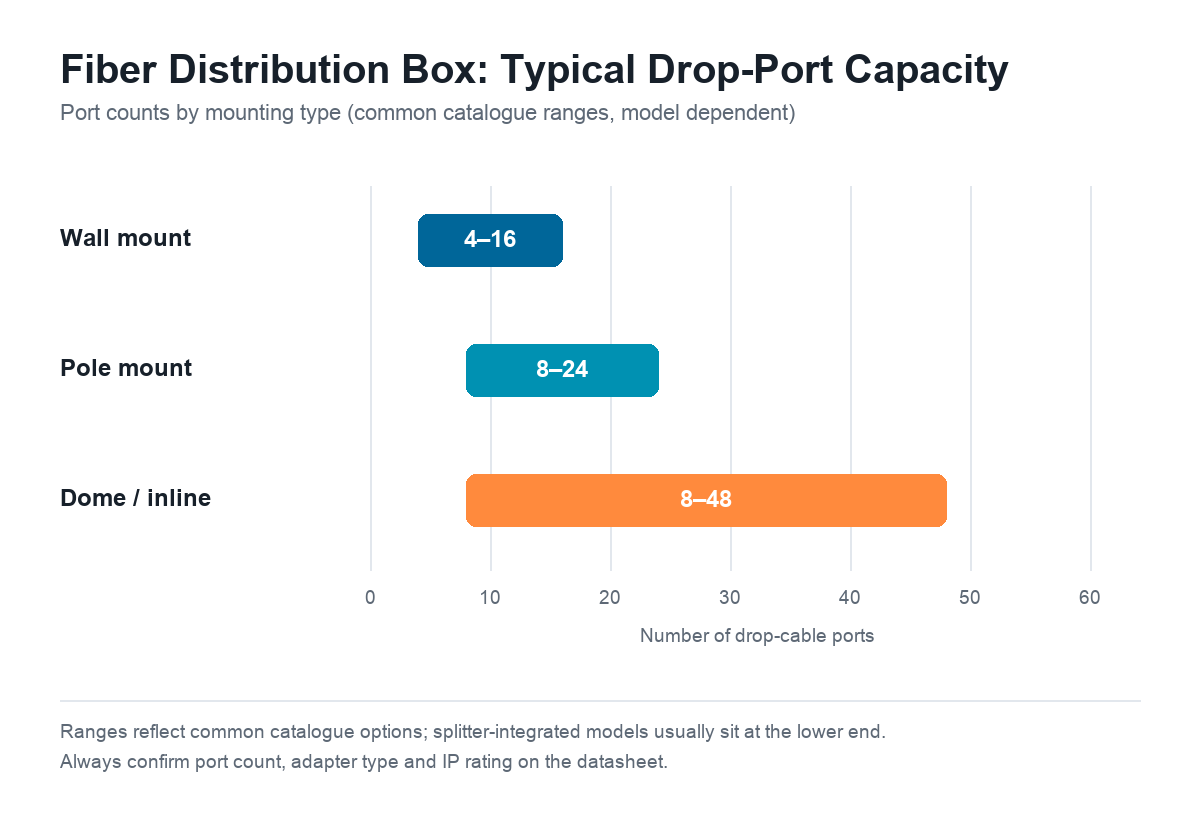
Table of Contents
- What a Fiber Distribution Box Does
- Wall Mount vs Pole Mount vs Dome
- IP Ratings: What Outdoor Boxes Really Need
- Sizing Port Counts and Splitter Capacity
- Adapter Types and Termination Choices
- Housing Materials: PC, ABS and SMC
- Fiber Distribution Box Buying Checklist
- Frequently Asked Questions
What a Fiber Distribution Box Does
In an FTTH outside plant, the distribution box is the handoff point where a larger distribution cable is broken out into individual subscriber drop cables. Inside the fiber distribution box you will find three functional zones: a splice or storage area for the incoming cable, an adapter panel where each port is patched to a drop cable, and cable-entry glands that keep the enclosure sealed once the cables are pulled through. In PON designs, the splice area often also hosts the PLC splitter.
The box is deliberately passive and simple, but every subscriber depends on it. A poorly sealed or undersized box becomes a chronic fault point: water in the splice tray, drop cables strained against sharp edges, or ports added beyond the tray’s storage capacity. For a broader taxonomy of ODN enclosures, see our earlier overview; this guide focuses on choosing among fiber distribution box mounting styles and ratings.
Wall Mount vs Pole Mount vs Dome: Choosing by Route Position
The fastest way to narrow the choice is to look at where the box will physically live: each mounting style assumes a different surface, cable entry direction and typical port count.
Wall-Mount Distribution Boxes
Wall-mount boxes are the default for last-drop distribution in residential areas, campus buildings and MDUs. They bolt flat onto a building wall, riser shaft or equipment-room wall, above flood levels, away from mowers and vehicles, and easy for technicians to reach. Cable entry is usually from the bottom or rear, which helps rain run off instead of pooling at the glands.
Typical configurations run from compact 4–8-port units for a single building entrance up to 16- or 24-port boxes serving a cluster of homes or a multi-floor riser. A wall-mount fiber distribution box is also the natural home for a 1×8 or 1×16 PLC splitter when the design places splitting at the building level. If your project serves apartments or offices with interior wiring, start here.
Pole-Mount Distribution Boxes
Pole-mount enclosures serve overhead routes where no wall is available: rural and suburban aerial builds and campus trunk runs along poles. They hang on a pole with a mounting band or bracket, cable entries facing downward. Because the box is exposed on all sides and shakes with wind loading, seal quality and strain relief matter more than on a sheltered wall.
Port counts of 8–24 are typical, and many pole-mount models include an internal splitter tray so the tap point can sit mid-route rather than back at a cross-connect. Two practical checks for pole deployments: confirm the bracket fits the pole diameter range in your build spec, and confirm the glands accept the flat-drop or round-drop cable your crews actually pull. On aerial routes it is common to combine a pole-mount fiber distribution box with a separate fiber optic cabinet further upstream for the main cross-connect.
Dome and Inline Enclosures
Dome (vertical) and inline (horizontal) closures handle the heavier end of the distribution layer: buried trunk segments, aerial express runs and splice points where a large distribution cable must be divided. These units prioritize splice capacity over adapter ports — a dome closure commonly stores dozens of splices in stacked trays, while an inline box with a mid-span entry lets the ribbon continue through while tapping out a limited number of drop ports.
Choose dome or inline styles when the route segment needs protection — buried plant, road crossings, long aerial spans — rather than a technician-friendly subscriber termination point. Many operators deploy both: a closure on the trunk and a smaller wall- or pole-mount fiber distribution box at the cluster it feeds.
IP Ratings: What Outdoor Boxes Really Need
The IEC 60529 IP code, and the performance categories it inspired in ITU-T passive node element standards, is the common language for enclosure sealing. The two digits mean: first digit, solids protection; second digit, water protection.
- IP54 — dust-protected and resistant to splashing water. For indoor stairwells, corridors and sheltered equipment rooms.
- IP65 — dust-tight and resistant to water jets. The practical minimum for an outdoor fiber distribution box in most climates; it survives wind-driven rain and routine cleaning.
- IP67 — dust-tight and resistant to temporary immersion. Specify this for buried handholes, flood-prone areas, and ground-level boxes that may sit in standing water after storms.
One engineering note: an IP rating describes the enclosure as delivered, with cables installed and glands torqued. A box rated IP65 in the catalog can leak if crews punch oversized entry holes, skip the grommets, or leave unused ports open. Buy models with plug-type sealing grommets for unused entries, verify the gasket compresses at the specified torque, and treat gel-filled entry systems as worth their small premium in avoided truck rolls.
Sizing Port Counts and Splitter Capacity
Undersizing a fiber distribution box is the most expensive way to save money. Retrofitting a second box later means re-entry into a sealed enclosure, re-routing drop cables, and downtime on live subscribers. Size the port count with headroom from day one:
- Count subscribers served at the box, not homes passed: one port per active drop, plus spare ports.
- Add 20–30% spare ports on greenfield builds, or match your operator’s standard redundancy rule.
- Decide where splitting happens. If the box hosts the PLC splitter, reserve a tray sized for it; splitter legs occupy the same adapter panel as direct-drop ports.
- Check slack-storage depth. Each port carries a meter of stored pigtail plus service loops; a 24-port box needs more tray depth than a 12-port one.
- Match entries to cable types. A box taking one 12-fiber distribution cable and 16 flat drops needs different glands than one feeding 16 round patch cords.
As a reference frame, catalogue models typically offer wall-mount boxes in the 4–16-port range, pole-mount boxes from 8–24 ports, and dome or inline closures reaching 8–48 drop ports with far higher splice counts. On multi-site projects, standardizing on one or two port counts per zone simplifies spares management: one gasket kit, one gland size, one adapter type.
Adapter Types and Termination Choices
Most FTTH distribution ports are SC adapters: SC/APC (green) for GPON links carrying RF video, SC/UPC where the network is data-only and loss budgets are comfortable. Keep the whole chain consistent: an APC adapter should meet an APC-connectorized drop, because mixing UPC and APC hardware on one path adds insertion loss and reflection. Our earlier article on UPC vs APC polish covers the return-loss numbers.
The second decision is how ports get terminated. Three approaches coexist in the field:
- Splice pigtails inside the box — lowest loss and the most flexible, but requires a fusion splicer and skilled labor on site.
- Factory pre-terminated ports — the distribution cable arrives connectorized and installation becomes plug-in: faster deployment, consistent quality, higher cable cost.
- Field-installable connectors — a fiber optic fast connector terminates the drop in minutes without splicing equipment, suiting repair work and small last-meter jobs; losses run a little higher, so budget accordingly in the link calculation.
For large new builds, pre-terminated or spliced pigtails usually win on lifecycle cost; for maintenance and small extensions, fast connectors keep a two-person crew productive without hauling a splicer up a pole.
Housing Materials: PC, ABS and SMC
Housing material drives impact strength, UV behavior and price. Polycarbonate (PC) offers high impact resistance and is common on outdoor wall- and pole-mount boxes; ABS is cost-effective but turns brittle under prolonged UV, so it belongs indoors or under cover. Sheet molding compound (SMC), a compression-molded fiberglass composite, is the traditional choice for larger outdoor enclosures: corrosion-resistant, heat-tolerant and dimensionally stable for decades. Match material to mounting — SMC or UV-stabilized PC for exposed poles and facades, ABS for indoor risers — and check that hinges, latches and glands are as weather-resistant as the shell, because seals fail before housings do.
Fiber Distribution Box Buying Checklist
Before releasing a purchase order, confirm these items on the datasheet — the list reads quickly and catches most procurement mistakes:
- Mounting style matches the route (wall, pole, dome/inline); bracket fits your pole diameter if applicable
- Port count and adapter type (SC/APC or SC/UPC), with the spare-port rule applied
- IP rating appropriate to the install position, with sealing grommets for unused entries
- Splitter tray present and sized, if splitting happens in the box
- Cable entry sizes accept your actual distribution and drop cable diameters
- Slack-storage depth sufficient for pigtails and service loops at full port count
- Housing material rated for the environment (UV-stabilized PC or SMC outdoors)
- Hinge, latch and fastener materials corrosion-resistant (stainless or plated); grounding provision where lightning exposure exists
- Packing format and per-box labeling, so crews can verify counts on delivery
Frequently Asked Questions
How many drop ports should a fiber distribution box have for an apartment building?
Size to live subscribers plus 20–30% spare ports. A 24-unit building typically uses one 16-port box at the entrance plus a second unit, or a single larger model, depending on riser routing.
Can a distribution box and a splice closure be used interchangeably?
Not really. A splice closure protects joints and may store many splices but offers few or no adapter ports; a fiber distribution box provides subscriber-facing adapter ports with less splice storage. Trunk protection uses closures; subscriber handoff uses distribution boxes, and some larger enclosures combine both.
Wrapping Up
A fiber distribution box is a small line item with a long service life, and the wall-mount, pole-mount and dome options exist because routes differ. Match the mounting style to the route position, seal to the environment the box actually faces, size the ports with headroom, and keep adapters consistent end to end — those four decisions eliminate most field failures before the first cable is pulled. If you are preparing an FTTH or FTTx bill of materials, our full range of fiber distribution box models — wall-mount, pole-mount and splitter-integrated designs — covers the configurations in this guide, and our team can help match port counts and IP ratings to your build spec.